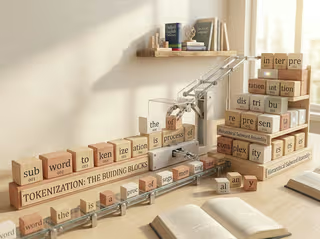

I am a big fan of educational resources that visualize complex concepts, making them tangible and allowing for building intuition. During the preparation of a one-day workshop on how LLMs work architecturally, I scouted some resources. This post presents a list of tools and visualizations I find helpful for understanding and teaching large language models. I will update this list as I find new tools worthy of addition.
Whole Architecture
Transformer Explainer
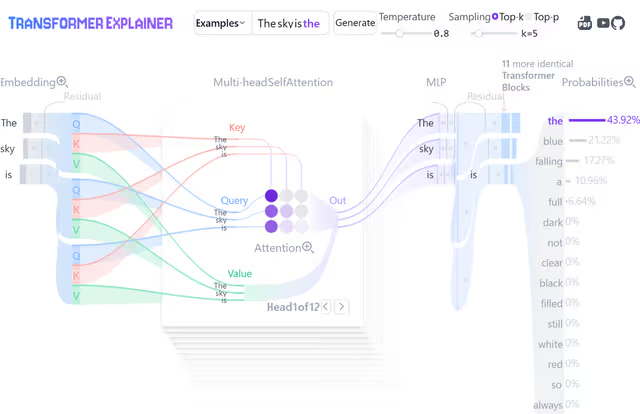
Transformer Explainer (introduced by Cho et al. (2024)) is one of the most valuable tools in this list. Contradictory to its name, it does not visualize the basic encoder-decoder transformer architecture, but rather the autoregressive decoder architecture of GPT-2 specifically, which is fundamental to how language models work today.
What makes this tool exceptional is that it allows interactive assessment of each of the different processing steps and works not with a mockup but actually runs the GPT-2 model in your browser (after downloading 600MB of model weights, which is admittedly a lot). This makes it great for explaining different concepts at a high level. It is specifically valuable for showcasing attention and decoding mechanisms.
I consider it very useful as a common thread throughout workshops and lectures. You can explain individual concepts with different specialized visualizations, then come back to this visualization as an overview that ties everything together, helping students see how the pieces fit into the whole.
LLM Visualization by Brendan Bycroft
LLM Visualization by Brendan Bycroft offers a different perspective through 3D rendered architectures for the models GPT-2 (small), nano-gpt, GPT-2 (XL), and GPT-3. The rendered models don’t abstract parameter sizes or operations and show every single parameter for the smaller models, while keeping the scale consistent for larger models. This allows you to “explore the algorithm down to every add & multiply, seeing the whole process in action” and makes it great for showing comparisons between different models regarding size.
The tool provides a writedown and an animated walkthrough on the different parts. However, the size of these models can get overwhelming, and the models look like space ships from far away. This can be both a strength and a limitation depending on what you want to emphasize in teaching.
3B1B Series on Large Language Models
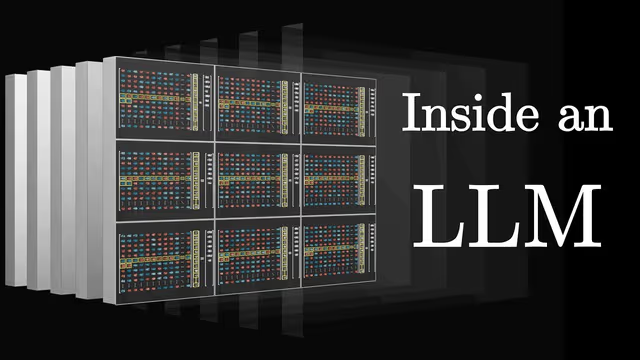
Grant Sanderson has become popular for producing intuitive visualizations for complex concepts in math and machine learning. Rightfully so, and it is no different for his 3-part series on transformers.
With a total runtime of 76 minutes, it provides a great walkthrough of all the different steps on the basis of GPT-3, using intuitive explanations and excellent visualizations. It is great for building intuition and ties it all together by cumulatively summing up parameters of each individual step explained, ending up at the 175B parameters GPT-3 uses.
What I really value are short insights like the information and experiment he provides on the superposition concept in Part 3 of the series, which really helped me dig deeper and understand how embeddings work.
microgpt Playground
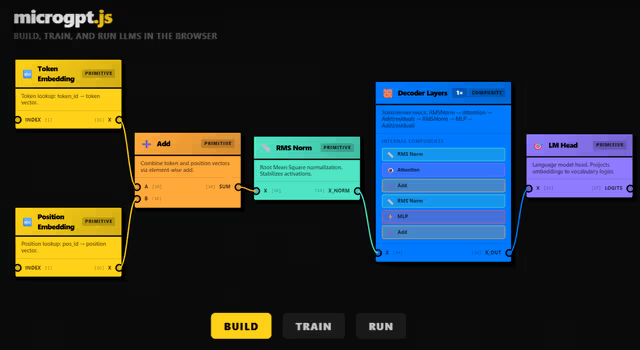
microgpt Playground by Joshua Lochner is a Hugging Face Space only recently published. Joshua works on transformer.js, a library that allows you to run Hugging Face transformers directly in your browser, with no need for a server.
This is an educational neural network builder, allowing you to build and train a tiny LLM directly in your browser, learning about their architecture from the ground up. While I haven’t used it myself yet, I believe it could be great when complemented with some tutorials in the form of guided experiments.
Tokenization
Byte-Pair Encoding Visualizer
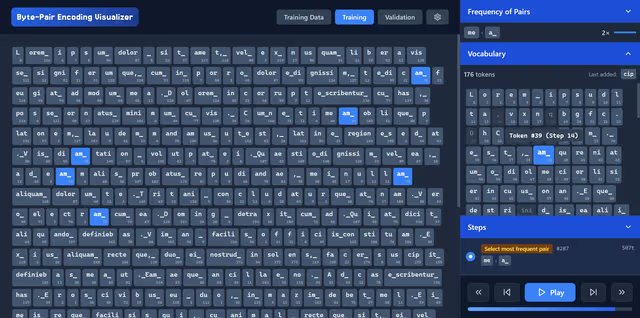
Building vocabularies for tokenization is one of the few steps that happens before the otherwise end-to-end training process of large language models. The most commonly used algorithm for building vocabularies is the byte-pair encoding algorithm, originally described by Philip Gage in 1994 for compressing data. Sennrich et al. (2016) proposed repurposing the BPE compression algorithm as a tokenization algorithm.
I built an interactive tool at philipmueller.dev/bpe-visualization/ that helps visualize how the algorithm iteratively joins the most frequent token pairs to build a vocabulary from the ground up. It features settings to both emulate the original algorithm used for compression, as well as adjustments made for repurposing it to build LLM vocabularies.
GPT Online Tokenizer
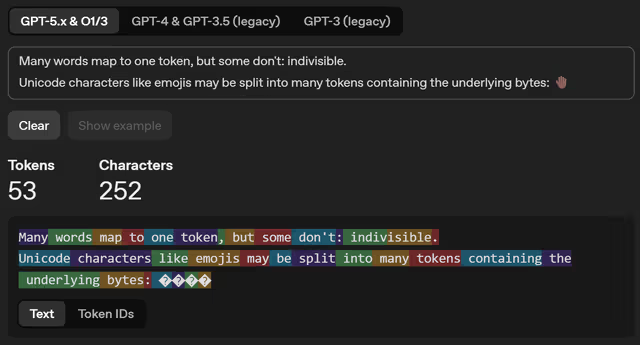
The GPT Online Tokenizer is an OpenAI-hosted online tool for trying out tokenization on user-provided input. It is great for letting students explore tokenization of different inputs, specifically for different capitalizations, different languages, emojis, typos, and technical terms.
Embeddings
Word Embedding Demo
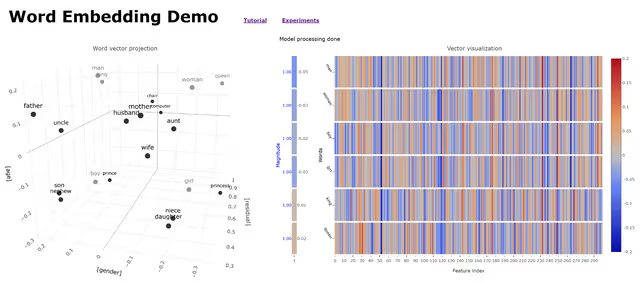
The Word Embedding Demo by the CMU School of Computer Science was introduced with the associated paper by Bandyopadhyay et al. (2022). It uses “300-dimensional pre-trained word vectors without subwords, generated from a fasttext.cc dataset containing a mix of Wikipedia text and news stories.”
After downloading the model, it allows for interactive assessment of embedding vectors. Dimension reduction is applied and vectors are viewed in a 3-dimensional graph. This allows visualization of prominent semantic relationships that are captured as geometric directions in embedding space, such as the resulting vector from the operation king − man + woman lying closest to the embedding of “queen”.
The tool is tailored for educational usage in K-12 settings and provides a tutorial and experiments students can engage with.
Gensim Downloader
If you want to let students programmatically explore embeddings, the gensim package provides access to datasets for this purpose in Python. I found the “glove-wiki-gigaword-50” model ideal for educational and interactive exploration, a compact and efficient dataset that uses 50-dimensional vectors (lightweight and fast to load) and captures broad semantic relationships between words.
import gensim.downloader

# replace with "word2vec-google-news-300" for Google News Word2Vec (Warning: much bigger size!)
model = gensim.downloader.load("glove-wiki-gigaword-50")
print("Vocabulary size:", len(model.key_to_index))

# 🍣 - 🇯🇵 + 🇩🇪
vec = model["sushi"] - model["japan"] + model["germany"]

# Find most similar tokens to this vector
results = model.most_similar(positive=[vec], topn=10)
print("Top 10 most similar tokens:\n")
for word, score in results:
    print(f"  {word:15s}  similarity = {score:.3f}")
# Output:
# 🍴 gourmet          similarity = 0.692
# 🍟 fries            similarity = 0.672
# 🌭 sausages         similarity = 0.652
# 🍔 hamburger        similarity = 0.638
Superposition
Superposition is one of the core concepts in explainability, trying to understand how large language models store knowledge and model language using embeddings. The idea is that during training, if there are more features than dimensions, models are capable of “cramping” vectors that are almost orthogonal to one another. This allows them to represent many more features than there are dimensions, while facing minimal performance loss.
This is briefly shown by 3B1B in “How might LLMs store facts — Superposition”. While this is counterintuitive in lower dimensions, he presents an experiment where he is able to fit 10,000 vectors in a 100-dimensional space, that are all nearly orthogonal (between 89° and 91° to one another). The Johnson-Lindenstrauss Lemma he references states that the amount of vectors you can “cramp in” grows exponentially with dimension.
The Toy Models of Superposition post by Anthropic researchers, also released as a paper (Elhage et al., 2022), provides a visualized walkthrough of the concept. Especially the visualizations may be very helpful in introducing this concept.
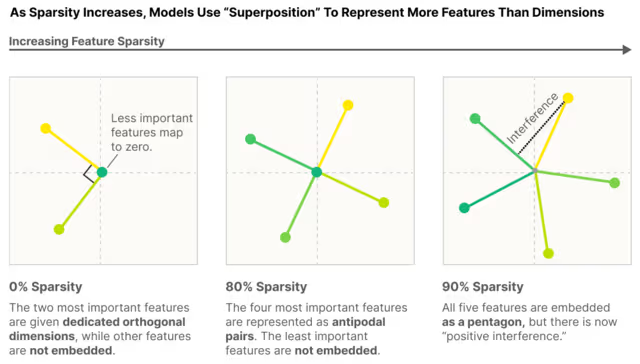
A post by Axel Sørensen, Toy Models of Superposition: Simplified by Hand ( 2024), further breaks the concept down and showcases this on a simple example, making it very tangible.
Neuronpedia
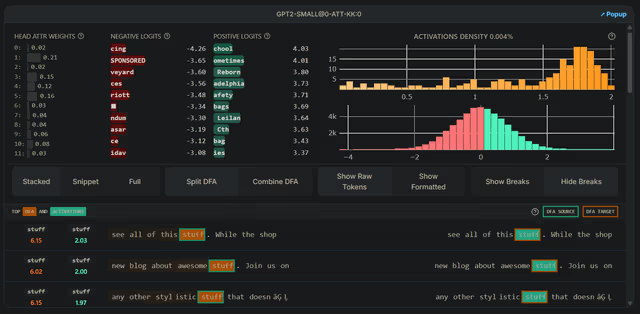
I found Neuronpedia after delving deeper into explainability in LLMs. This is a website linked to research, visualizing findings and providing interactive explorers. What I found most intriguing is the Attention SAE Research Paper, where they attempt to decode superimposed features in embedding space on the last layer hidden states by training sparse autoencoders on them, allowing them to separate features.
While the interactive tools are great for visualizations, these are very advanced concepts that go beyond a basic LLM workshop.
Attention
BertViz — Attention Mechanism Explorer
BertViz is an open-source tool for visualization of the attention mechanism of transformer models. There is a nice writedown called Explainable AI: Visualizing Attention in Transformers by Abby Morgan on this tool. It visualizes attention weights at model, head, and neuron levels, making it useful for interpretability and understanding why the model attends to certain tokens.
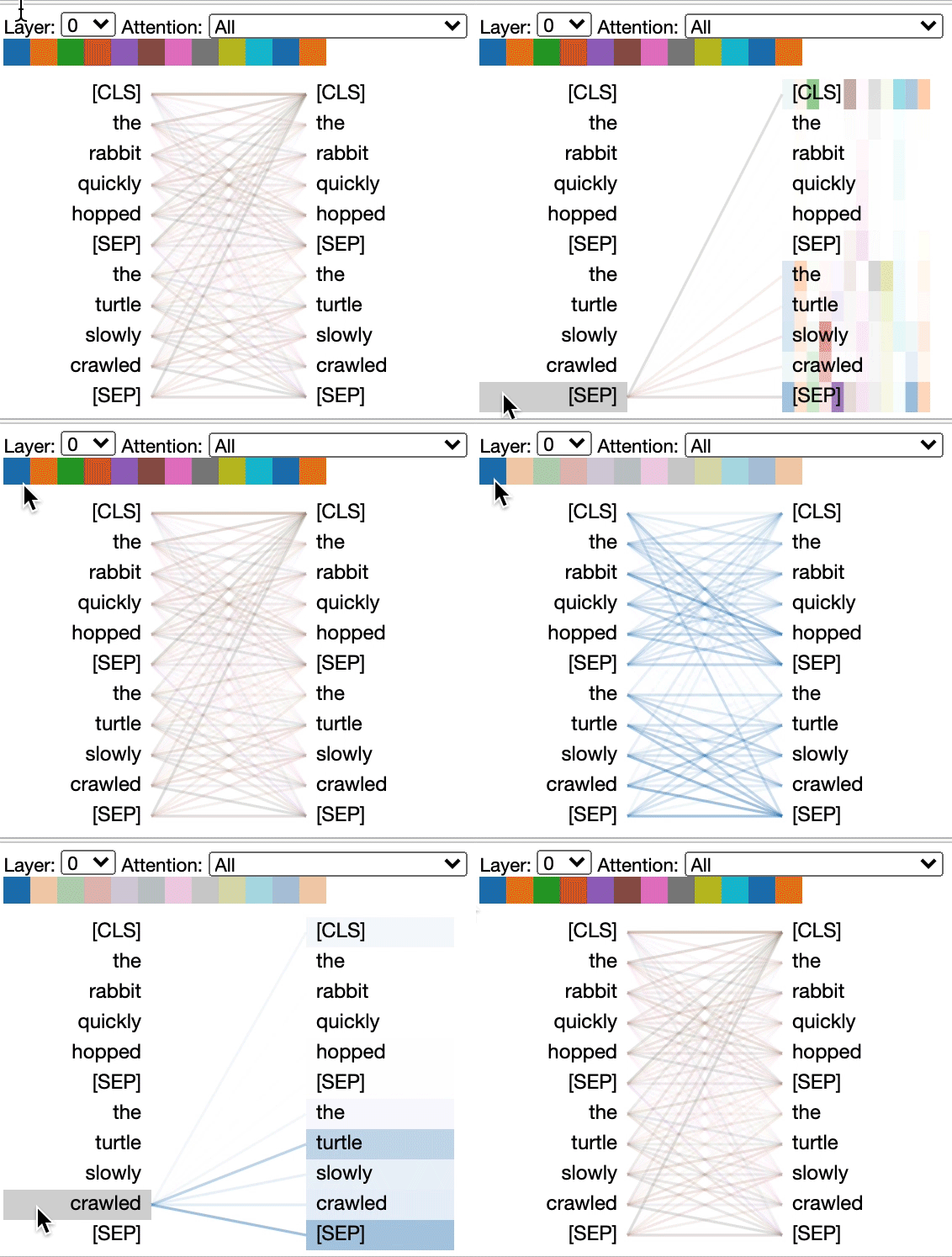
It is primarily a Python library tool, which requires using notebooks or Comet integration to showcase it. However, there are several Colab notebooks available featuring this library, making it easy to access and show on the fly to students without having to run the cells yourself — so no hardware required! Examples include the BertViz Interactive Tutorial and Tensor2Tensor Intro.
Decoding
Logit Lens
Logit lens was introduced by nostalgebraist in interpreting GPT: the logit lens, one of the early diagnostic experiments done in explainability of LLMs. Less about sampling and more about unembedding, logit lens is an approach where you apply the unembedding matrix not on the last layer hidden states, but on intermediate layers (after applying normalization).
This shows interesting behavior of how the model converges on its prediction as layers progress. There is also a nice post on this by Jay Alammar called Finding the Words to Say: Hidden State Visualizations for Language Models, visualizing this behavior.
Be wary though: Early residuals were not trained to be decoded by the unembedding matrix. So Logit Lens is a diagnostic, not a faithful counterfactual. For causality, you need patching or ablation.
LLM Sampling Methods
LLM Sampling Methods by Romain Dal Maso (“Artefact2”) is a small online tool that shows the effect of different sampling methods, such as temperature, top-p, and top-k, on the generation. It is great because it visualizes the probability distribution and distribution threshold imposed by different methods.
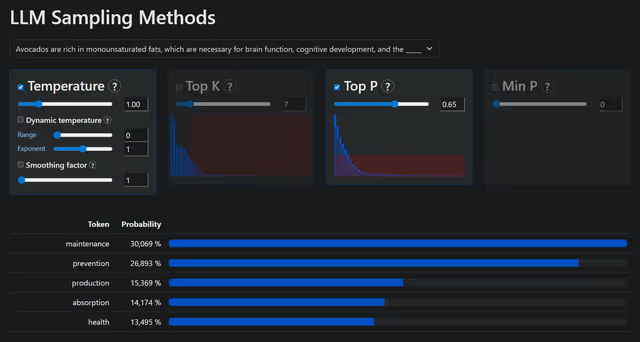
LLM Sampling Methods is a forked version by Shmulik Cohen that improves on clarity and focuses on sampling methods most relevant in LLM decoding, making it better for short demos.
Mixed
Prompt Caching Blog Post
Prompt caching: 10x cheaper LLM tokens, but how? by Sam Rose (found via Simon Willison’s blog) is a nice blog entry on prompt caching that has some valuable short visualizations for embeddings, dimensionality, and attention with the goal of explaining why and how prompt caching works.
Jay Alammar’s Blog
“Visualizing machine learning, one concept at a time,” Jay Alammar’s blog features many great visual posts on concepts in LLMs, featuring illustrations, animations, and interactive demos. Topics range from concepts generally relevant to LLM architecture, such as attention, to deep dive posts on explainability.
The blog provides crosslinks in posts to notebooks that allow students to explore concepts such as embeddings or that provide great interactive visualizations, e.g., for attention, that you can directly show in the classroom.
Tools I Am Aware of but Have Not Yet Found the Time Looking Into Them
The following provides a short list of tools that are also attempting to visualize concepts in large language models, but where I did not yet have the time to evaluate them regarding their usability in educational settings:
- VisBERT: Hidden-State Visualizations for Transformers introduced by van Aken et al. (2020)
- Mixture of Experts (MoE), Visually Explained by Jia-Bin Huang found via LinkedIn
- microgpt by Andrej Karpathy is a 200 lines of pure, dependency-free Python implementation to train and inference GPT. The screenshot of the 200 lines really emphasize how simple and elegant transformers are at their core. This post has inspired several derivative attempts of making it even shorter, i.e. in 88 loc by Lalith Kothuru